4 Ways to Track Website Calls and Prove Conversion for Local Services
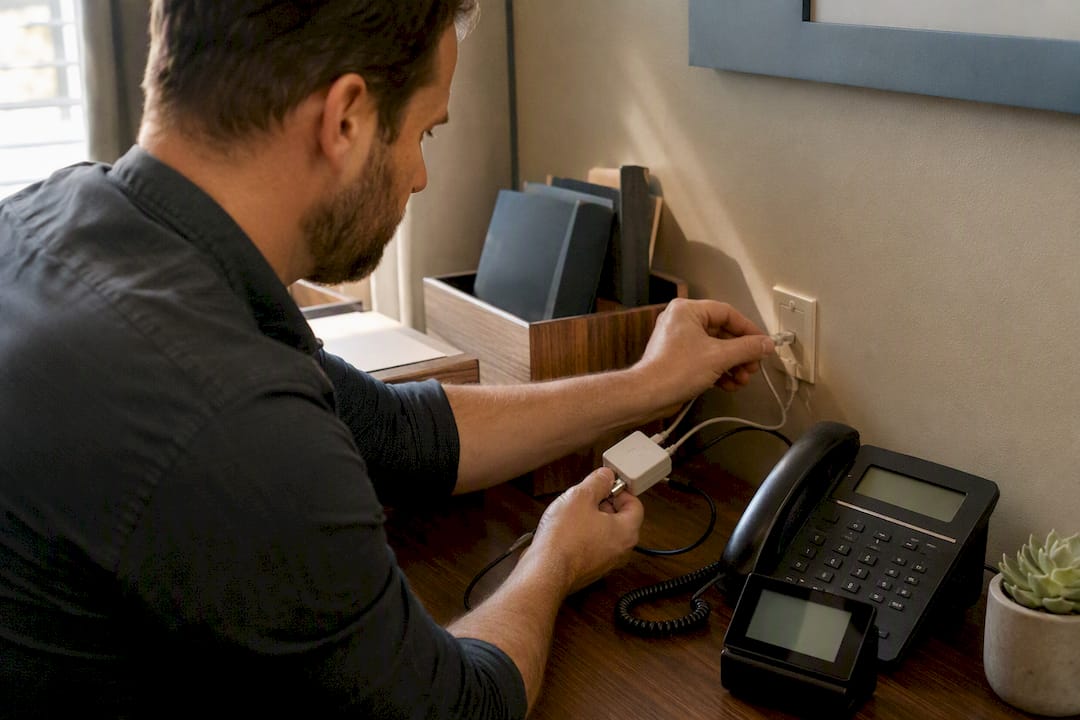
The fastest, most reliable way to track calls from your website is Dynamic Number Insertion through a call-tracking platform, paired with Google Ads forwarding numbers for paid traffic and click-to-call event tracking for mobile visitors. DNI gives you full cross-channel attribution down to the keyword; Google’s forwarding numbers work best if Ads is your only paid channel. Either way, wire the results into GA4 and your CRM, or the data dies in a call log nobody checks.
TL;DR:
- Dynamic Number Insertion provides detailed attribution down to specific keywords and campaigns, but requires a dedicated call-tracking provider and sufficient number pool size.
- Google Ads call conversion tracking is simple to set up and works well if paid search is your primary traffic source, but it excludes organic and other non-Google channels.
- Click-to-call event tracking is quick to deploy and affordable but misses calls from manual dialing or saved numbers, limiting its comprehensiveness.
- Ensuring your canonical phone number remains consistent across your website, Google Business Profile, and directories is crucial to avoid SEO penalties and attribution errors.
- Offline campaigns such as print ads and QR codes should use unique tracking numbers or tagged URLs to accurately measure their call impact.
Table of Contents
- Four Ways to Track Calls From a Website (Quick Comparison)
- How Dynamic Number Insertion Works (and When You Need It)
- Setting Up Google Ads Website Call Conversions
- Click-to-Call Tracking: The Fast, Imperfect Win
- What to Look for in Call-Tracking Software
- Implementation Checklist for Accurate Call Attribution
- Fixing the Most Common Call-Tracking Problems
- Tracking Calls That Start Offline but Point Back to Your Site
- Which Attribution Model Should Get Credit for the Call?
- Beyond Call Volume: Measuring Quality, Not Just Quantity
- Proxium’s Approach to Call Tracking for Local Service Clients
- Get Call Tracking Set Up Right the First Time
- Sources
- FAQ
Four Ways to Track Calls From a Website (Quick Comparison)
Not every business needs the same setup. A law firm running Google Ads and organic SEO needs different tracking than a plumber who just wants to know if the yard sign works.
- Dynamic Number Insertion (DNI): Swaps the visible phone number based on traffic source, giving you keyword and campaign-level attribution across every channel. Requires a call-tracking provider and a pool of tracking numbers, which adds a recurring cost.
- Google Ads website call conversions: Uses free Google forwarding numbers to attribute calls straight to the ad click that generated them. Setup is simple, but it only covers Google Ads traffic, not organic search, email, or direct visits.
- Click-to-call event tracking: Captures clicks on
tel:links through Google Tag Manager and pushes them to GA4 as events. Cheap and fast to deploy, but it misses anyone who dials your number from memory or reads it off a business card. - Manual or CRM-based tracking: Front desk staff ask “how did you hear about us?” and log the answer, sometimes alongside UTM capture on the contact form. It works for low call volume, but self-reported source data is notoriously inaccurate.
How Dynamic Number Insertion Works (and When You Need It)
DNI runs on a simple trick: a JavaScript snippet detects the visitor’s traffic source, UTM parameters, or Google Click ID, then swaps the phone number displayed on the page for one drawn from a tracking pool. When the visitor calls, the call-tracking platform records the session data, tying that call to the exact landing page, campaign, and referral source that brought them in.
The reason JavaScript-based swapping wins over server-side rendering is local SEO. If your website’s HTML source code, Google Business Profile, and local directory listings ever get out of sync on your phone number, you risk a NAP (name, address, phone) inconsistency that search engines can penalize. Keeping the canonical number in HTML and letting JavaScript handle the swap after page load protects both your rankings and your attribution data at the same time.
Pool sizing matters more than most marketers realize. A common rule of thumb is to allocate sufficient tracking numbers based on daily visitors from a given channel, with high-intent traffic requiring fewer numbers as the same visitor rarely returns within the attribution window.
Three things break DNI in practice:
- Search engine crawlers indexing a swapped number before the script fires, creating a phantom NAP mismatch.
- Undersized number pools causing session collisions, where two visitors get attributed to the same call.
- Swap timing that fires after a visitor has already screenshotted or copied the default number.
Pro Tip: Test your DNI setup in an incognito window from three different traffic sources (direct, a Google search, and a link with UTM parameters) before launch. If the number on the page doesn’t change within a second or two, your script is loading too late.
Setting Up Google Ads Website Call Conversions
If paid search is your main phone-call driver, Google’s own forwarding-number system gets you attribution without a third-party platform. Here’s the setup:
- In Google Ads, create a new call conversion action and download the phone snippet it generates, or note the conversion ID and label for a Tag Manager build instead.
- In GTM, create a new tag using the “Google Ads Calls from Website Conversion” tag type, enter your conversion ID and label, and set it to fire on all pages where your number appears.
- Add the phone snippet (or a small callback function) so any
tel:links on the page update dynamically to display the Google forwarding number to eligible visitors. - Set a minimum call duration in your conversion settings. Google counts a call as a conversion only once it exceeds your chosen threshold, which filters out accidental dials and wrong numbers.
A common misconfiguration: sites default to showing only one tracked number per page, which is fine for a single storefront but breaks down fast if you run multiple ad groups pointing to the same landing page. Use national number formatting rather than a leading plus sign to avoid known display glitches in some regions.
Statistic Callout: Google’s documentation specifically ties conversion counting to a configurable minimum call length, not just “any call answered.” A 60 second threshold is a common starting point, since it filters out voicemail hangups without excluding real inquiries.
Test by calling your own forwarding number from a phone that hasn’t visited the site recently, and confirm the conversion shows up in Google Ads within a few hours (it won’t be instant).
Click-to-Call Tracking: The Fast, Imperfect Win
If you need something working this week, click-to-call event tracking is the lowest-lift option on this list. Every tel: link on your site is already a hook you can grab with GTM.
- Set up a GTM trigger that fires on clicks matching
tel:in the link URL, or push acall_clickevent directly to the data layer from your phone number’s onclick handler. - Send that event to GA4 with, at minimum, the landing page, traffic source or medium, and a session identifier so you can join it to other behavior later.
- Consider a second event,
call_started, if your phone system can confirm the call actually connected rather than just recording the tap. - Remember this method only sees clicks. Anyone who reads your number off the screen and dials manually, or calls from a number they saved during a previous visit, never shows up in this data.
Click-to-call is the right short-term move when you’re mobile-heavy, need data now, and can layer in DNI or CallRail-style tracking later without ripping anything out.
What to Look for in Call-Tracking Software
Picking a platform comes down to matching features to how your business actually operates, not chasing the longest feature list.
The non-negotiables: JavaScript-based DNI, keyword-level attribution (not just campaign-level), native GA4 and Google Ads integrations, and CRM webhooks that fire in near real time. Beyond that, look at operational fit. Do you need local numbers in multiple area codes? Call recording and transcription for sales coaching? Spam filtering so junk calls don’t inflate your lead count?
- Number pool size and geographic coverage for the markets you actually serve.
- Recording, transcription, and spam/robocall filtering.
- Pricing tier structure, since call-tracking platforms often price by number of tracking numbers or minutes, not flat monthly fees.
- Agency-specific features like white-labeling and sub-accounts if you manage multiple clients, versus a leaner SMB-focused tool if you don’t.
Two platforms illustrate the split well: some tools lean hard into clean attribution and marketing integrations, while others, built more for contact centers, emphasize call routing, IVR, and softphone features. Neither is wrong; they’re built for different jobs. Weighing CallTrackingMetrics vs CallRail (or the reverse) mostly comes down to whether you need marketing attribution or call-center infrastructure.
Pro Tip: Before signing a contract, ask any vendor exactly how they handle call recording consent and how long recordings are retained. This matters more than any dashboard feature if you operate in a two-party consent state.
Implementation Checklist for Accurate Call Attribution
Getting the tech right doesn’t help if the process around it is sloppy. Work through this order:
- Audit your canonical phone number across your website HTML, Google Business Profile, and every directory listing you can find, and fix any mismatches before you touch a tracking script.
- Install the DNI or click-tracking script, then verify it’s capturing UTM parameters and Google Click IDs correctly using your browser’s developer console.
- Test the number swap itself from at least three simulated traffic sources, confirming the displayed number changes and the underlying HTML number stays canonical.
- Confirm the webhook or GA4 event fires correctly when a test call comes through, and check that it lands in your CRM with the right source attached.
- Document your call qualification rules in writing. A call duration threshold is commonly set to filter out hang-ups and wrong numbers, which can be adjusted based on typical length of qualified sales conversations.
- Use a shared
call_idorsession_idto join call records between your analytics platform and CRM, rather than relying on timestamp matching, which breaks constantly.
Statistic Callout: The strongest architecture for call-event delivery routes data through a webhook first: the provider detects the call, sends a webhook with call_id and metadata, then server-side tagging validates it and forwards a confirmed conversion event to GA4 and the CRM simultaneously. This reduces client-side data loss compared to relying on browser-based tracking alone, and it respects consent settings more cleanly since nothing fires until the server confirms the call happened.
Fixing the Most Common Call-Tracking Problems
Most call-tracking failures trace back to a handful of repeat offenders.
- Number isn’t swapping for some visitors: Check whether your bot-detection logic is misfiring on real users, and confirm your script fires before the visitor can see or copy the default number.
- Calls landing in “direct” or “referral” instead of the real source: Your UTM parameters or Google Click ID probably aren’t being captured before the swap happens. Fix the capture order first.
- Local rankings dipped after launching DNI: Double-check that your canonical number in HTML, your Google Business Profile, and your directory listings all match, and that DNI swaps are happening client-side only, never touching your indexed pages.
- GA4 and CRM show different call counts: Add a
call_idfield to both systems and confirm webhook delivery with a manual test call. Mismatched counts almost always mean one system is dropping events silently.
Tracking Calls That Start Offline but Point Back to Your Site
Not every call traces back to a click. A print ad, a QR code on a truck wrap, or a flyer at a trade show can all generate calls, and if you’re only tracking website visits, that volume disappears into a black hole labeled “unknown.”

The fix is treating offline materials the same way you’d treat a digital campaign: give each one its own dedicated tracking number, or a QR code that lands on a URL with unique UTM parameters before triggering DNI. A QR code on a billboard should point to a landing page tagged utm_source=billboard&utm_medium=offline, and DNI picks up those parameters exactly like it would from a paid search click. Print a static number on the flyer itself if there’s no digital landing step at all; a dedicated number that never appears anywhere else tells you unambiguously where that call came from.
This matters more than most marketers assume. Local service businesses often run a mix of yard signs, vehicle wraps, and direct mail alongside digital campaigns, and without offline call tracking, all that spend looks invisible in a dashboard while digital channels take undeserved credit for calls that print ads actually generated. A radio ad with a vanity number, a direct mail piece with a QR code, and a trade show banner with a printed number all deserve their own tracking identity. The setup cost is a few extra numbers in your call-tracking pool. The payoff is knowing whether that $2,000 print run actually worked.
Which Attribution Model Should Get Credit for the Call?
Once you’re capturing call data across channels, the harder question shows up: which touchpoint gets credit when a customer saw three ads, read a blog post, and then called two weeks later?
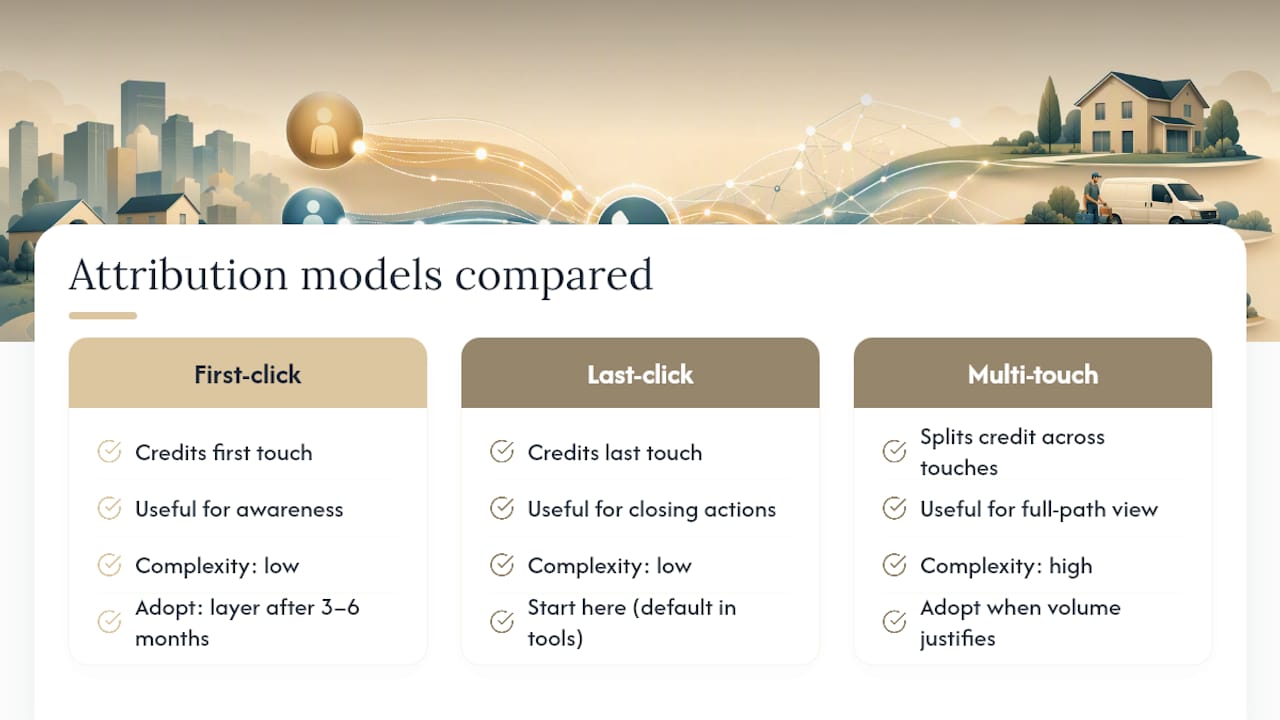
First-click attribution credits whatever brought the visitor to your site the very first time, useful for measuring which channels build initial awareness. Last-click attribution credits whichever source they engaged with right before they picked up the phone. Most call-tracking platforms default to last-click because it’s the simplest to implement and matches how Google Ads reports conversions natively.
Multi-touch attribution splits credit across every touchpoint in the customer’s path, weighting them by position, time decay, or a custom model. It’s the most honest picture, but it demands more data infrastructure than most local service businesses have in place, since you need to stitch together every session a visitor had before you can distribute credit meaningfully.
For most marketers reading this, the practical answer is to start with last-click because it’s what your tools already support, then layer in first-click reporting once you have three to six months of call data to see whether certain channels consistently plant the seed even when they don’t close the call. Multi-touch modeling is worth the investment once your call volume and ad spend justify the added complexity, not before.
Beyond Call Volume: Measuring Quality, Not Just Quantity
A dashboard full of call counts feels productive, but volume alone tells you almost nothing about whether those calls are turning into business.
Call quality scoring starts with duration and outcome, not just whether the phone rang. A 45 second call that ends in a hang-up carries a different signal than an 8 minute conversation that ends in a booked appointment, even though both count as “a call” in a raw tally. Layer in lead scoring by tagging calls with outcome data in your CRM: booked, quoted, not qualified, spam. Once that tagging is consistent, you can calculate a real conversion rate per channel, not just a call count per channel.

This is where the earlier work on call qualification rules pays off. If you’ve set a 60 to 90 second duration threshold and you’re feeding call_id data into your CRM, you can pull a report that shows, say, organic search generating fewer total calls than paid search but converting at a noticeably higher rate once you account for qualified leads only. That’s a very different budget conversation than one based on raw call counts. Tracking event data correctly in GA4 also helps you spot whether call volume from a given source is trending up or down before it shows up in revenue, giving you a earlier warning than waiting on closed deals.
Proxium’s Approach to Call Tracking for Local Service Clients
We treat the phone number on a client’s website as a trust signal first, a tracking asset second. That ordering matters. It’s easy to break local SEO chasing attribution data, and we’ve seen sites lose Google Business Profile consistency because a DNI setup swapped the canonical number instead of a JavaScript layer sitting on top of it.
Our default build uses JavaScript-based DNI, keeps the real number in HTML and schema markup, and wires call events into both GA4 and the client’s CRM so a call shows up as a lead the same way a form submission does. We document qualification rules upfront, usually a duration threshold agreed with the client, so “60 calls this month” means something specific rather than counting every wrong number and hang-up.
For law firms, home service companies, and other local businesses we manage SEO and web design for, that clarity is often the missing piece. Most already have some Google Ads data. Very few can tell you which organic keyword actually generated last Tuesday’s biggest job.
— Bryan
Get Call Tracking Set Up Right the First Time
Watching call data trickle into a spreadsheet is one thing. Having it flow cleanly into GA4 and your CRM, tied to the exact campaign and keyword that generated the call, is another. That gap is usually a technical implementation problem, not a strategy problem, and it’s exactly the kind of work that falls through the cracks when your website vendor and your SEO team are two separate companies pointing fingers at each other.

Proxiumdigital builds call tracking directly into the sites we design and manage, so DNI, GTM tagging, and CRM webhooks are part of the build instead of a bolt-on project six months later. A typical engagement starts with an audit of your current phone number setup across your site, Google Business Profile, and directories, moves into deployment and testing, and ends with monthly reporting that shows call volume alongside the keywords and campaigns driving it. If your current site can’t tell you which channel generated your last five phone leads, talk to us about a call tracking and SEO audit and see what a properly wired setup actually looks like.
Sources
For setup detail beyond this guide: Google’s own call conversion documentation covers phone snippets and conversion thresholds; Twilio’s call tracking use cases detail custom-build options; CallRail explains DNI mechanics in depth; Invoca’s best-practice notes cover NAP preservation; and LimeCall’s overview shows a SaaS implementation of the same concept.
- What is dynamic number insertion? | CallRail blog
- Set up Tracking calls to a phone number on a website — Google Ads Help
- What is dynamic number insertion (DNI) and how does it help marketing? — Invoca
FAQ
Can Someone Track My Phone Calls Without Me Knowing?
Call-tracking software tracks calls made to businesses through their websites and ad campaigns, not private calls between individuals, and legitimate platforms require the business to disclose recording where law requires it.
Does Dialing *57 Trace a Call?
Call trace features offered by some phone carriers flag the last incoming call to law enforcement; these features have nothing to do with website or marketing call tracking and won’t reveal a caller’s identity to you directly.
Can I Check Someone’s Call History Online?
You can’t access another person’s private call history through call-tracking software; this technology only records calls that come in through a business’s own tracked phone numbers, not personal phone records.
How Do I Know if a Business Call I Made Is Being Tracked?
If a business displays a phone number that changes depending on how you found their site, or if you hear a recorded disclosure at the start of the call, that’s a sign call-tracking software like DNI is in use.
What Call Duration Should Count as a Real Lead?
A 60 to 90 second minimum is a common starting threshold for filtering out accidental dials and voicemail hang-ups, though you should adjust it based on how long your typical qualified conversation actually runs.