Thin Content SEO: How to Find and Fix Value-Deficit Pages

Thin content is any page that fails to give a searcher something worth their click, not a page under some arbitrary word count. A 300-word page that fully answers a specific question is not thin. A product description copied from a manufacturer feed without original content usually is thin.
The immediate SEO consequence is index bloat: too many low-value URLs signal to Google that your site skews toward search-engine-first content rather than people-first content, which raises site-level Helpful Content risk. Cross-referencing Search Console’s Pages and Performance reports with crawl data is a reliable way to find candidate thin pages at scale.
Your next step: open the Search Console Pages report, sort by impressions with near-zero clicks, and start classifying every flagged URL into one of four buckets.
- Expand pages with real search demand but no unique value yet
- Consolidate near-duplicate pages targeting the same intent
- Noindex pages that must exist for users but shouldn’t compete for rankings
- Delete and redirect pages with no traffic, no backlinks, and no reason to exist
Key Takeaways
Thin content SEO problems come from a value deficit, not a length deficit, and fixing them requires a repeatable audit, classify, and act framework.
| Point | Details |
|---|---|
| Define by value, not length | A page is thin when it fails to satisfy search intent, regardless of word count. |
| Watch for site-level risk | Helpful Content evaluation looks at ratios across a domain, not single pages in isolation. |
| Audit with Search Console first | Cross-reference Excluded statuses and Performance data before touching a crawl tool. |
| Match the fix to the page | Expand pages with demand, consolidate duplicates, noindex necessary utility pages, delete and redirect the rest. |
| Stage changes and monitor | Test on a batch of 20 to 50 pages and give results 4 to 12 weeks before judging impact. |
| Prevention beats cleanup | Proxiumdigital builds SEO into site templates during design to stop thin patterns before launch. |
Table of Contents
- What Is Thin Content, Really?
- How Does Thin Content Hurt SEO and User Experience?
- What Are the Most Common Types of Thin Pages?
- How Do You Identify Thin Content at Scale?
- When Should You Expand, Consolidate, Noindex, or Delete a Page?
- How Do You Prioritize Fixes and Measure the Results?
- How Proxiumdigital Builds Sites That Avoid Thin Content From Day One
- An Editorial Take on Fixing Thin Content
- Get a Site Built So Thin Content Never Becomes Your Problem
- Sources
- FAQ
What Is Thin Content, Really?
Word count is a symptom, not the diagnosis. A support page that answers “how do I reset my password” in four sentences can rank and convert for years. A 1,500-word blog post stitched from a manufacturer’s spec sheet, with no independent testing or perspective, is still thin even at that length. Content quality SEO comes down to whether a page satisfies the searcher’s actual intent, not how many paragraphs it took to get there.
The confusion happens because thin content used to correlate with short content, back when Google’s older filters leaned on length as a rough proxy. That proxy broke down as templated, AI-assisted, and affiliate content ballooned in volume while staying just as empty. Recognizable thin templates show up on nearly every mid-size site:
- Product pages with unedited manufacturer copy
- Location pages that swap a city name into an identical template
- “Top 10” roundups with no original testing or comparison logic
- Category pages with three sentences of filler above a product grid
- Old blog posts that summarize a topic without adding a new angle
How Does Thin Content Hurt SEO and User Experience?
Thin pages waste crawl budget. Every hour Googlebot spends re-crawling a thousand near-identical faceted URLs is an hour it isn’t spending on the pages you actually want ranked, and that inefficiency compounds as a site grows.
The bigger risk is site-level. Google’s Helpful Content guidance doesn’t just demote individual thin pages, it evaluates the overall ratio of helpful to unhelpful content across a domain. A site loaded with low-value pages can drag down rankings for its genuinely strong content, because the system reads the pattern, not just the single URL. Pruning that underperforming inventory has been shown to restore traffic and concentrate link equity on the pages that deserve it.
Behaviorally, thin pages show up as high bounce rates, near-zero time on page, and conversion rates that never move regardless of traffic volume. Search engines watch these engagement signals too, and topical authority erodes when a domain has hundreds of pages that never earned a return visit or a backlink.
What Are the Most Common Types of Thin Pages?
Most sites accumulate thin content through five recurring patterns, and once you know the shapes, they’re easy to spot in a crawl export.
- Affiliate and manufacturer copy pages that reuse a supplier’s product description verbatim, offering zero independent evaluation.
- Programmatic or faceted category pages generated by filter combinations (color plus size plus brand) that produce thousands of near-empty URLs.
- Doorway pages built around slight keyword variations of the same page, often targeting different city names with no unique local detail.
- Tag pages, author archives, internal search results, and soft-404s that get indexed by default through a CMS’s automatic taxonomy settings.
- AI-generated or guest posts with no first-hand experience, assembled from other articles without testing, data, or a point of view.
Every one of these types can be legitimate when it’s built with intent. The problem is scale without editing: a faceted page that adds genuine filtering value for users is fine; ten thousand of them indexed with three lines of boilerplate text is not.
How Do You Identify Thin Content at Scale?
Finding thin pages on a 50-page brochure site is a manual job. Finding them across 5,000 URLs requires a workflow.
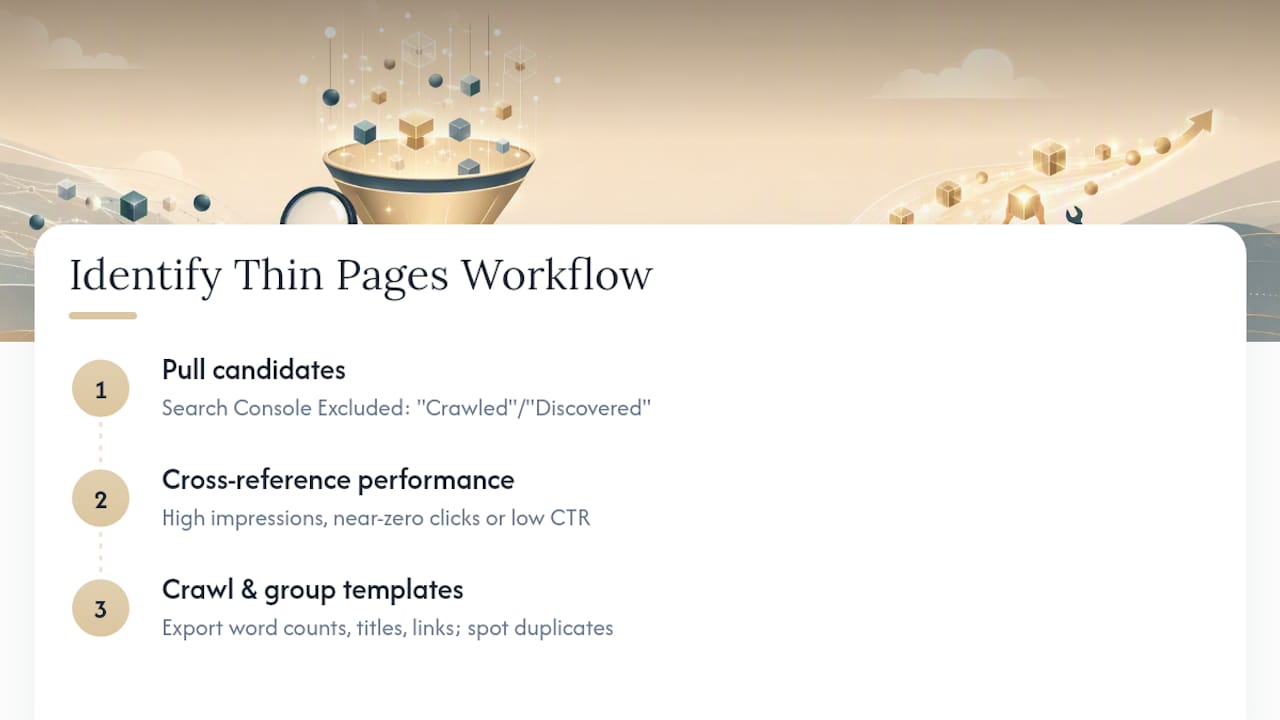
Step 1: Pull the candidate list from Search Console. Open the Pages report and check the Excluded tab for “Crawled, currently not indexed” and “Discovered, currently not indexed.” Both statuses are Google’s own way of telling you it looked at a page and decided it wasn’t worth keeping in the index.
Step 2: Cross-reference Performance data. Filter for pages with high impressions but near-zero clicks, or clicks with a click-through rate well under what that ranking position should produce. A page ranking in position 8 with 2,000 impressions and one click is a strong candidate.
Step 3: Crawl the site and group URLs by template. Tools like Screaming Frog or Ahrefs’ Site Audit let you export title tags, word counts, and internal link counts, then sort by template pattern. If every product page in a category shares an identical opening paragraph, that’s a systemic problem, not an isolated one.
Trust these signals together, not individually. Low word count alone means nothing. Zero backlinks plus zero clicks plus a template match against dozens of near-duplicate URLs is the combination worth acting on. A single metric out of context just creates noise in your candidate list.
When Should You Expand, Consolidate, Noindex, or Delete a Page?
Every flagged page answers four questions before you touch it: Does it have backlinks? Does it get any organic traffic? Would a real user find it useful if it stayed live? Is there actual search demand for the topic?
- Expand when the topic has demand and the page has some traffic or links, but the content itself is shallow. Add original analysis, a first-hand example, a data point, or a structured direct answer near the top of the section, all of which improve both ranking potential and AI citation odds. Updating an existing page with age and links usually outperforms publishing something new from scratch.
- Consolidate when two or more pages target the same intent. Merge the strongest content into one URL, then 301 redirect the others into it so link equity and ranking history transfer instead of vanishing.
- Noindex when a page needs to exist for users or navigation (an internal search results page, a thin author archive) but has no business competing for organic rankings.
- Delete and 301 redirect when a page has no traffic, no links, and no future use. Redirect it to the closest relevant survivor page, never to the homepage by default, which wastes the equity the deleted page carried.
Pro Tip: Before deleting anything, check whether the page has any external backlinks in Ahrefs or Google Search Console’s Links report. A page with even a handful of referring domains is often worth a 301 redirect rather than a flat removal.
For faceted or ecommerce catalog pages, the choice usually comes down to canonical tags versus noindex: canonicalize filter combinations that still deserve to pass value to a parent category, and noindex the combinations that generate duplicate or near-empty results with no independent search demand.
- Confirm the redirect target actually satisfies the same user intent
- Check that internal links pointing to a removed page get updated, not left dangling
- Wait for re-crawl confirmation in Search Console before declaring the fix complete
How Do You Prioritize Fixes and Measure the Results?
Not every thin page deserves attention on day one. Build a simple prioritization matrix using four inputs: current organic traffic, existing backlinks, conversion value, and how many other pages share the same broken template. A triage approach that fixes the highest-impact pages first produces faster, more visible wins than working alphabetically through a spreadsheet.

Stage the rollout. Fix or prune a sample batch, in the range of 20 to 50 pages, and watch how Search Console responds before applying the same treatment site-wide. Careless mass deletion without redirects can lose link equity that took years to build.
Give changes 4 to 12 weeks before judging results. Track indexing status, impressions, clicks, average position, and conversions, and remember that last-click attribution models can understate how content quality improvements affect revenue further down the funnel.
- Batch by template or category, never the whole site at once
- Set a calendar reminder to re-check Search Console at the 6-week mark
- Watch for one common pitfall: redirecting dozens of unrelated pages to a single URL, which itself can look like a manipulation pattern
How Proxiumdigital Builds Sites That Avoid Thin Content From Day One
Most thin content isn’t written on purpose. It’s a byproduct of a CMS template, a rushed launch, or SEO bolted on after the site is already live. Proxiumdigital bakes SEO into the build itself, so page templates, internal linking, and content briefs get reviewed before they scale into thousands of thin URLs.
The fastest way to prevent a thin-content problem is to never generate the template that creates one. Fixing 4,000 identical location pages after launch costs far more than reviewing the template before it ships.
- Technical audit before design work starts, not after
- Content briefs built around demonstrable first-hand experience
- Ongoing performance reporting to catch new thin patterns early
An Editorial Take on Fixing Thin Content
The conventional advice on thin content still leans on outdated heuristics: hit 1,500 words, add more keywords, publish more often. None of that addresses the actual problem, which is a value gap between what a page promises and what it delivers. You can pad a page to 2,000 words and make it worse, not better, if none of those extra words come from real experience or original analysis.
Where most guides fall short is treating detection and remediation as separate projects handled months apart. They should be the same workflow, run on a cycle, because new thin pages get created the moment a template ships without review. That’s the real lesson buried in the Helpful Content system: it doesn’t just punish existing thin pages, it punishes the pattern that keeps producing them.
If you’re triaging a backlog right now, prioritize by template, not by page. Fixing one page rarely moves the needle. Fixing the pattern behind 200 identical pages does.
— Bryan
Get a Site Built So Thin Content Never Becomes Your Problem
Cleaning up thin content after the fact costs time most business owners don’t have, and DIY audits often miss the systemic template issues that keep generating new thin pages every month. Proxiumdigital designs and manages websites where the SEO work happens during the build, not as damage control six months after launch.

That means local service businesses and professional firms get page templates, internal linking, and content structure reviewed before anything goes live, so the thin-page patterns covered in this guide never get the chance to scale. Ongoing website management keeps new pages from drifting back into the same problem as your site grows. Check Proxiumdigital’s SEO optimization services to see how an audit of your current site would work, or review pricing for Metro Detroit clients to get a straight answer on cost before you commit to anything.
Sources
- Creating helpful, people-first content — Google Search Central
- Content pruning: Boost SEO by removing underperformers — Ahrefs
- Thin Content SEO: How to Find and Fix It in Search Console | SEO Heatmap
FAQ
Is SEO Dead Now That AI Search Is Everywhere?
No. AI-driven search still relies on crawling, indexing, and quality signals like people-first content, and pages that satisfy real user intent remain the foundation both Google and AI engines pull from.
What Are the Four Main Types of SEO?
Technical SEO, on-page SEO, off-page SEO, and local SEO are the four categories practitioners generally work within, each addressing a different layer of how a site gets found and ranked.
What Is the 80/20 Rule in SEO?
It’s the idea that a small share of your pages, usually the highest-traffic or highest-converting ones, drive most of your results, which is exactly why prioritizing fixes by traffic and backlinks matters more than fixing pages in alphabetical order.
Is SEO Still Worth Investing In?
Yes. Organic search remains one of the few channels where fixing a structural problem, like thin content, produces compounding gains instead of a one-time spike, and integrated approaches like Proxiumdigital’s build that durability in from the start.
How Long Does It Take to See Results After Fixing Thin Content?
Most practitioners recommend monitoring for 4 to 12 weeks after changes, since re-crawling, re-indexing, and ranking adjustments don’t happen instantly.