Keyword Mapping to Pages: The Template and Workflow

Keyword mapping assigns one primary keyword to each page on your site, with secondary keywords supporting it in headings and body copy. That single rule prevents two pages from competing for the same query, and it forces you to notice where you have gaps instead of duplicates.
The first move is mechanical, not strategic. Open a keyword-map spreadsheet and run site:yourdomain.com "your primary keyword" in Google for your five most important terms. Anything that returns more than one result is a candidate for consolidation before you write another word of content.
- Prevents cannibalization by giving every URL a distinct job
- Surfaces content gaps you didn’t know existed
- Builds topical authority search engines and AI systems can recognize
Pro Tip: Run the site: check before you touch your content calendar. Fixing an existing cannibalization problem almost always beats publishing a new page.
Key Takeaways
Keyword mapping works because assigning one primary keyword per page eliminates cannibalization, exposes content gaps, and gives every page a defined job search engines and AI systems can recognize.
| Point | Details |
|---|---|
| One page, one primary keyword | Assign a single primary term per URL and use secondary keywords in H2s and anchors to support it. |
| Run the cannibalization check first | Use site:yourdomain.com [keyword] to find duplicate pages before creating anything new. |
| Use a status column | Mark every mapped keyword as To Optimize or To Create so the map turns into scoped work. |
| Review quarterly, act immediately on signals | Full reviews every quarter, but ranking drops or cannibalization alerts should trigger an immediate check. |
| Build mapping into the site itself | Proxiumdigital integrates keyword mapping into custom website builds and ongoing SEO optimization from the start. |
Templates and Tools Worth Bookmarking
- Semrush’s free keyword mapping template for ready-made columns
- Ahrefs’ mapping guide for the cannibalization diagnostic tab
- Google Search Console and Google Keyword Planner for query and volume data
Table of Contents
- What Is Keyword Mapping to Pages?
- Why Does Keyword Mapping Prevent Ranking Problems?
- How Do You Map Keywords to Pages Step by Step?
- Turning Your Map Into On-Page Changes
- How Often Should You Update a Keyword Map?
- What Most Keyword Mapping Advice Gets Wrong
- Get Keyword Mapping Built Into Your Website From Day One
- Sources
- FAQ
What Is Keyword Mapping to Pages?
Keyword mapping is the process of assigning a unique primary keyword to each specific page on your website, so search engines know exactly what that page is supposed to rank for, according to Neil Patel. It sounds obvious until you audit a real site and find three service pages all trying to rank for “commercial roof repair.”
The primary keyword is the one term a page is built to win. Secondary keywords are the supporting cast: related phrases, long-tail variations, and question-based queries that reinforce the primary term without competing with it. Practitioners typically group a small number of long-tail variations under a single primary cluster and use them as H2s, H3s, and internal anchor text rather than spinning up a separate page for each one, a pattern Neil Patel’s guide documents well. That distinction alone stops most sites from bloating their content inventory with near-duplicate pages.
Search intent decides page type before keyword volume ever should. A query like “what is keyword mapping” is informational and belongs on a blog post or guide. “Keyword mapping tool comparison” leans commercial, suggesting a comparison page or landing page. “Hire keyword mapping consultant” is transactional and belongs on a services page with a clear call to action. Map intent first, keyword second, and your page types will make sense to both readers and search engines.
Why Does Keyword Mapping Prevent Ranking Problems?
Cannibalization happens when two or more pages target the same keyword and split ranking signals, backlinks, and click data between them instead of consolidating around one strong page. Google has to guess which page you actually want ranked, and it often guesses wrong, rotating between the two or ranking neither one well.
A finished map exposes this instantly. Sort your spreadsheet by primary keyword, and any term listed twice is a cannibalization flag waiting to be resolved.
- Reveals content gaps: topics your competitors cover that you have no page for
- Strengthens internal linking by giving you a defined destination for every relevant anchor
- Builds topical authority, since assigning topics to pages explicitly helps search systems recognize comprehensive coverage instead of scattered, disjointed content, per AudienceKey’s guide
There’s a newer payoff too. AI-driven search tools break a single user question into several related sub-queries, a pattern often called query fan-out, and a well-mapped page that covers its full keyword cluster is positioned to answer more of those sub-queries at once, a benefit Semrush’s mapping guide calls out directly. A thin page built around one exact-match phrase simply can’t do that. Mapping clusters instead of isolated keywords is now a practical requirement, not a nice-to-have for completionists.
How Do You Map Keywords to Pages Step by Step?
This is the part most guides gloss over: the actual mechanics of building a map that a team can use without you standing over their shoulder. Here’s the sequence that works whether you’re mapping 20 pages or 2,000.
1. Gather your inputs first. Pull three data sources before you open a blank spreadsheet: your keyword research pool (from Semrush, Ahrefs, or Google Keyword Planner), a Google Search Console export of queries you already rank for, and a full URL inventory of every live page on the site. Skipping the Search Console export is the most common mistake here. It shows you keywords you’re already halfway ranking for, which are almost always cheaper to push higher than starting from zero.
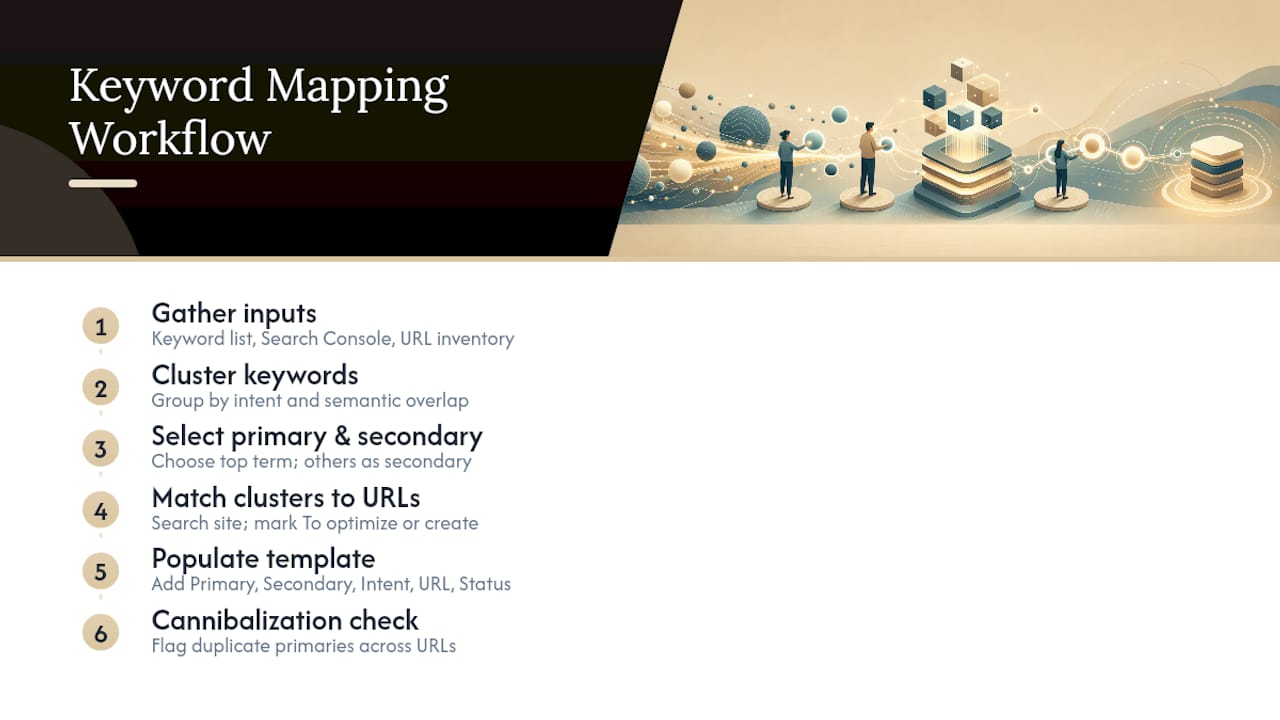
2. Cluster keywords into topics. Group your keyword list by shared intent and semantic overlap rather than by exact match. “Best running shoes for flat feet,” “flat feet running shoe guide,” and “running shoes flat feet support” are one cluster, not three. AI-assisted grouping tools can speed this up, and a guide on AI-driven keyword mapping walks through pairing automated clustering with manual review. Never skip the manual check. Automated clustering occasionally lumps genuinely distinct intents together, and a human catches that in seconds.
3. Pick a primary and secondary keywords per cluster. Choose the highest-value term in each cluster as primary, based on search volume and business relevance, then designate the remaining terms in that cluster as secondary. Backlinko’s step-by-step framework follows this exact structure: find, group, map, assign secondary terms, then set an action, according to Backlinko.
4. Match clusters to existing URLs.
Run site:yourdomain.com [cluster topic] for each cluster to check whether a page already exists. The site operator is a fast diagnostic for surfacing pages that already touch a topic, according to ALLIAI’s glossary, and it saves you from creating a near-duplicate of something you forgot you published two years ago. If a matching page exists, mark its status “To optimize.” If nothing exists, mark it “To create.”
5. Populate your template columns. A functional keyword map needs, at minimum: Primary Keyword, Secondary Keywords, Search Intent, Assigned URL, Page Type, Priority, Status, and Last Updated. Semrush’s free template follows this exact column structure, and for good reason. It’s the minimum information a second person needs to pick up a row and execute on it without asking you questions.
6. Run a cannibalization check. Filter your Assigned URL column and flag any primary keyword that appears against more than one URL. Ahrefs recommends building this as a dedicated diagnostic tab that flags duplicates automatically, according to Ahrefs’ keyword mapping guide. When you find one, you have three options: consolidate the weaker page into the stronger one and 301 redirect it, retarget one page to a genuinely different secondary keyword, or merge both into a single, more comprehensive page.
7. Assign owners and dates, then share it. Every row needs a named owner and a target date, or “To create” status becomes a graveyard of good intentions. Export the sheet to Google Sheets or a shared drive so writers, developers, and whoever owns internal linking can all work off the same source of truth. Teams use spreadsheets here specifically because they’re auditable and shareable, which cuts down on duplicated work across departments, a point Scale Growth Digital’s template guide makes well.
For a site in the 50 to 200 page range, a first-pass map typically takes four to eight hours, scaling up with site complexity and the number of stakeholders who need to review it.
Turning Your Map Into On-Page Changes
A finished map is useless sitting in a spreadsheet. The triage decision, optimize or create, should weigh three factors: traffic potential of the keyword, how difficult it will be to rank, and how directly the page ties to revenue. A page already ranking on page two for a high-value commercial term is almost always a better use of an afternoon than a brand-new blog post starting from zero, an approach Backlinko’s guide recommends as the more cost-effective default.
For pages marked “To optimize,” run through a fixed checklist: title tag, meta description, H1, URL slug, H2/H3 structure, and whether the page actually answers the supporting questions your secondary keywords imply. A page targeting “commercial HVAC maintenance contracts” that never mentions contract length or service frequency is missing semantic coverage a competitor’s page probably has.
- Pull anchor text for internal links directly from your secondary keyword list, not from generic phrases like “click here” or “learn more”
- Route links from supporting blog posts toward pillar pages to concentrate authority where it matters most
- Weight priority using a simple matrix: business value times traffic potential, divided by effort
Pro Tip: When two pages score similarly on the priority matrix, pick the one closer to a transaction. A commercial page that converts at 2% often beats an informational page with triple the traffic potential.
How Often Should You Update a Keyword Map?
A keyword map isn’t a document you write once. Search intent shifts, competitors publish new pages, and Google rolls out SERP features that change what “ranking well” even looks like for a given query.
- Review the full map quarterly for most sites. That cadence catches seasonal shifts and gradual ranking drift without demanding constant attention.
- Move to monthly reviews for fast-changing verticals or for your handful of highest-priority pages, where a missed shift costs real revenue.
- Trigger an immediate, out-of-cycle review when you see a sudden ranking drop, a cannibalization alert in Search Console’s performance report, a new SERP feature (a featured snippet or AI overview) displacing your listing, or a new competitor page outranking you.
- Between full reviews, do the light maintenance: update the “Last Updated” column whenever a page changes, rerun your cannibalization filter monthly, and refresh priority labels as business goals shift.
How Proxium Applies Keyword Mapping in Client Work
Proxium is a Michigan based SEO and web design agency, and keyword mapping is one of the first deliverables built into every integrated project. Because SEO gets baked into a site from the initial build rather than bolted on afterward, mapping happens before a single page goes live, not months later during a cleanup audit.
That sequencing has a direct payoff: sites built this way tend to load faster and rank sooner, since the information architecture and the keyword strategy were designed together instead of retrofitted.
- Proxium works primarily with local service businesses, professional firms, and growing brands that need a coherent digital footprint, not a patchwork of disconnected pages
- Ongoing website management includes performance reporting, so a client’s keyword map gets revisited as rankings and traffic data actually change
- The workflow ties directly to execution: a mapped “To optimize” page becomes a scoped task, not a suggestion that sits in a slide deck
What Most Keyword Mapping Advice Gets Wrong
Most guides treat keyword mapping as a research exercise. It isn’t. It’s a decision-making tool, and the decision it exists to force is optimize or create, right now, for this specific page. If your map doesn’t end in a status column with a name and a date attached, you’ve built a keyword list, not a map.
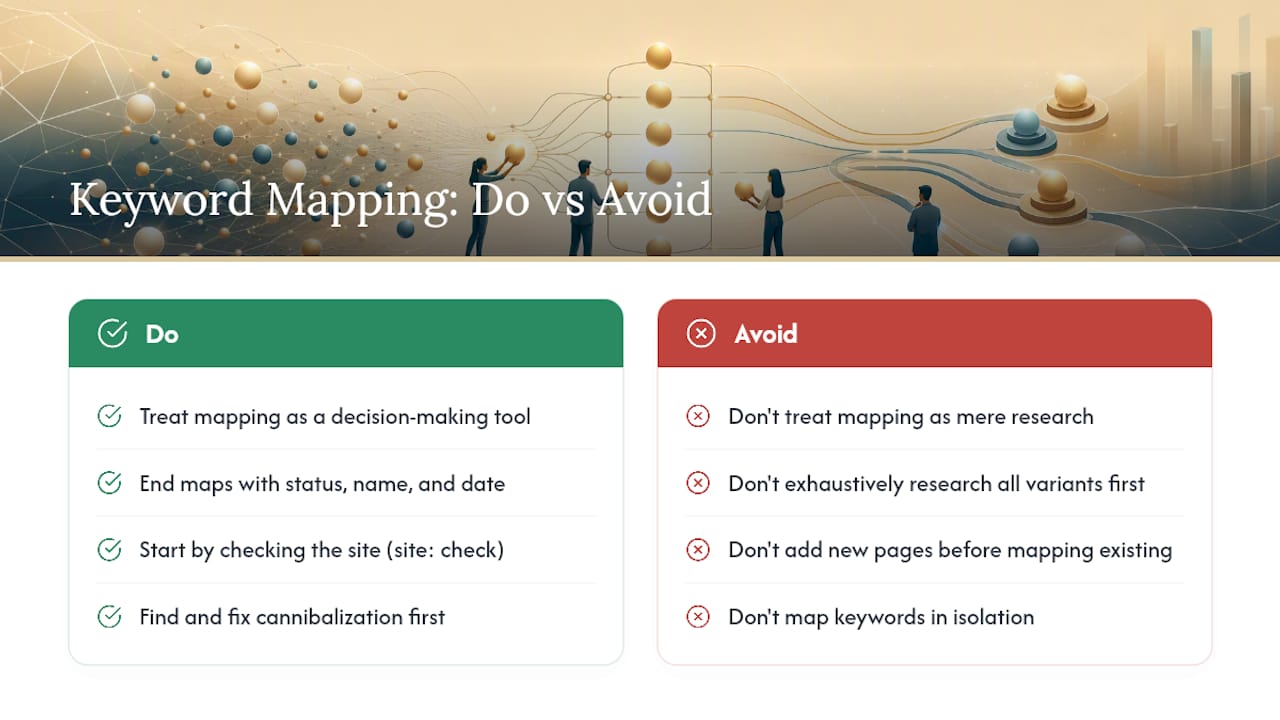
The overrated part of this whole practice is exhaustive keyword research upfront. Spending three weeks pulling every long-tail variation before you’ve mapped a single existing page to its query is backwards. Start with the site: check. Find your cannibalization first, because untangling two pages fighting each other for the same ranking is almost always higher leverage than adding a new one.
The underrated part is the AI search angle. Query fan-out means a single well-mapped page covering a full keyword cluster now answers more of a searcher’s actual question in one pass, which matters more every quarter as AI overviews absorb more click volume. Map clusters, not keywords in isolation, and revisit the map on a real schedule instead of once and never again.
— Bryan
Get Keyword Mapping Built Into Your Website From Day One
Most teams treat keyword mapping as a spreadsheet exercise that never quite turns into finished pages. Proxiumdigital builds the map into the actual site instead of handing you a document and wishing you luck executing it.

Because Proxiumdigital designs and builds websites with SEO integrated from the first wireframe, the keyword map isn’t a separate deliverable competing for your team’s time. It becomes the site’s structure: primary keywords assigned to URLs before development starts, secondary keywords built into the content plan, and a status column that turns directly into scoped work through Proxiumdigital’s SEO optimization services. For local service businesses and professional firms in Michigan juggling this alongside actual client work, that means no separate mapping project, no six week delay between research and execution, and no pages published without a clear job to do. Check current pricing and get a scoped plan for your site’s keyword map.
Sources
- Keyword mapping is the process of assigning a unique primary keyword to each specific page on your website — Neil Patel
- Keyword mapping for SEO: Guide + free template — Semrush
- Keyword Mapping: A Step-by-Step Guide — Backlinko
- Keyword Mapping for SEO: How To Do It + Free Template — Ahrefs
FAQ
How Do You Do Keyword Mapping?
Gather your keyword research, Search Console data, and full URL list, then cluster keywords by intent, assign a primary and secondary keywords to each cluster, match clusters to existing or new URLs, and mark each row’s status as To Optimize or To Create.
Is Google Keyword Planner Still Free?
Yes, Google Keyword Planner remains free to use with a Google Ads account, though search volume data appears in broader ranges unless you have active ad spend.
Can I Use ChatGPT for Keyword Research?
ChatGPT and similar tools can help cluster keywords by topic and suggest related long-tail variations, but they don’t pull real search volume or ranking difficulty data, so pair them with a tool like Semrush, Ahrefs, or Google Keyword Planner for the numbers.
How Often Should a Keyword Map Be Updated?
Review the full map quarterly for most sites, move to monthly for high-priority or fast-changing topics, and update immediately after a ranking drop or a cannibalization alert in Search Console.